Jellyfin Intro Skipper: how to skip intros and credits (2026 setup)
Install the Intro Skipper plugin, run its analysis task, and see which Jellyfin clients use Media Segments to skip intros, recaps and credits.
By Swiftly Player9 min read
Disclosure: we build Swiftly Player, one of the clients in this article. We point out where other apps do better.
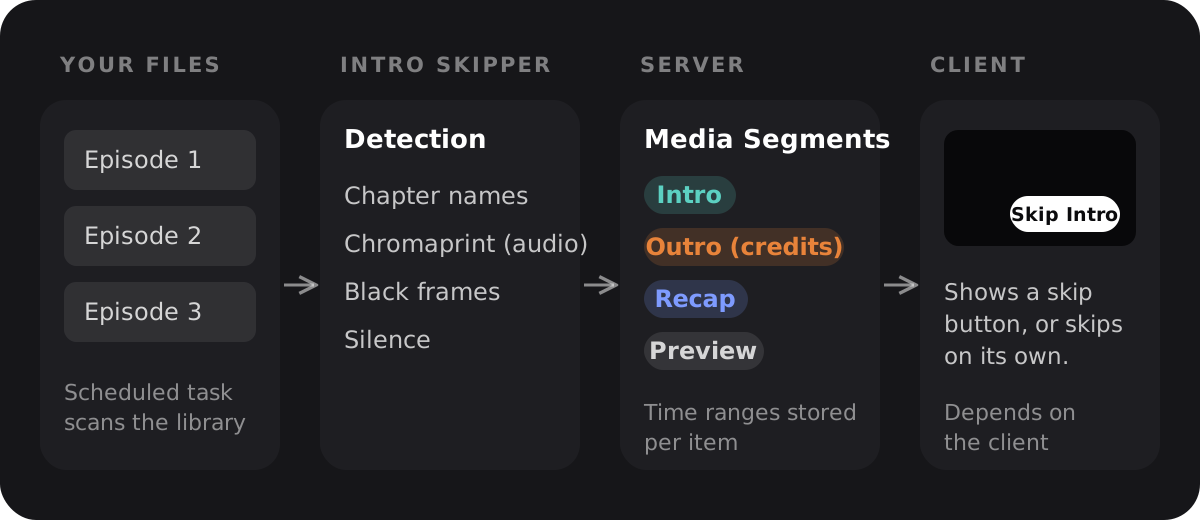
Jellyfin does not find intros or credits by itself. The server has a place to store them, called Media Segments, and a plugin has to fill it. For TV series, that plugin is usually Intro Skipper.
TL;DR
Add the repository https://intro-skipper.org/manifest.json in the Jellyfin dashboard, install Intro Skipper, restart, and run the task "Detect and Analyze Media Segments". The plugin writes intros, credits and recaps into Jellyfin's Media Segments (since server 10.10), and apps like the Jellyfin web client, Jellyfin for Android TV, Findroid and Streamyfin then show a skip button. Swiftfin had no released support at the time of writing.
What Media Segments are
Media Segments came with Jellyfin 10.10.0, released on October 26, 2024. They are time spans inside a video that apps can use, for example to show a button that skips the intro. According to the release post, 10.10 only adds the storage for segments. A plugin has to create them. The Jellyfin team published one such plugin, which works from chapter names.
The server source defines six types in MediaSegmentType: Unknown, Commercial, Preview, Recap, Outro and Intro. Credits are stored as Outro.
So the server only keeps a list of time ranges. Your app decides whether to show a skip button or to jump ahead automatically.
Intro Skipper: name, repository and history
The plugin is called Intro Skipper. The original project, ConfusedPolarBear/intro-skipper, was made for Jellyfin 10.8 and is now archived on GitHub. Work continues in intro-skipper/intro-skipper, owned by the intro-skipper GitHub organization. If an older guide points to the ConfusedPolarBear repository or its manifest, it is out of date.
Older guides often get two things wrong. The current README says:
- The manifest URL is
https://intro-skipper.org/manifest.json. It sends back a manifest that matches the Jellyfin version asking for it. In a browser it shows nothing, because the browser sends no Jellyfin version. - "As of Jellyfin 10.10, Intro Skipper does NOT modify the UI." Older versions added their own skip button to the web client. Today the plugin only provides Media Segments.
The plugin wiki explains how the data moves. The analysis creates timestamps, and the timestamps become Media Segments. Later runs overwrite the segments with the timestamps. So fix mistakes in the plugin's timestamp editor, not in the segments.
Requirements
At the time of writing, the README on the default branch (the 12.0 branch) lists these requirements.
- Jellyfin 12.0.0 or newer
- Jellyfin's fork of FFmpeg, version 7.1.3-1 or newer, with Chromaprint support. Chromaprint creates audio fingerprints. This FFmpeg is already included in the
jellyfin/jellyfinandlinuxserver/jellyfincontainers. On Debian-based installs it comes from thejellyfin-ffmpeg7package. On macOS you have to build FFmpeg with Chromaprint yourself (wiki instructions)).
There is also a separate 10.11 release line (releases). Its wiki page lists Jellyfin 10.11.6 or newer. The manifest adapts to the server version, so the URL is the same for both.
How detection works
Intro Skipper has four ways to find segments, according to the wiki.
| Method | What it uses | Limitation |
|---|---|---|
| Chapter | Named chapter markers in the file | Needs meaningful chapter names |
| Chromaprint | Audio fingerprints compared across episodes | Needs more than one file with the same audio; slowest method |
| Black frame | FFmpeg's blackframe filter | Runs on the CPU, can be inaccurate |
| Silence | Periods of silence in the audio | Can match unexpected quiet scenes |
By default, Intro Skipper only looks for an intro in the first 25 percent of an episode or the first 10 minutes, whichever is shorter. The intro must be between 15 seconds and 2 minutes long. You can change these limits under "Modify Segment Parameters" in the plugin settings.
Step by step: install Intro Skipper
When you are done, your episodes have skip data that apps can use. You need an administrator account and the Jellyfin web interface. If you plan to upgrade to Jellyfin 12.0, read this first. The 12.0 release notes recommend removing third-party repository plugins before the upgrade and adding them again afterwards.
- Back up your Jellyfin data directory. The plugin does not need it, but it helps if you later reset or rebuild segments.
- Open the Dashboard and go to Plugins.
- Open the repository page. In the current web client it is called "Manage Repositories" (12.0 release notes). The Intro Skipper wiki links straight to
http://localhost:8096/web/#/dashboard/plugins/repositories. Replacelocalhost:8096with your server address. - Add a new repository. Enter a name, for example
Intro Skipper. - Enter the repository URL
https://intro-skipper.org/manifest.jsonand save. - Open the plugin catalog and install Intro Skipper. If it is missing, the README says to check that the server runs the latest Jellyfin version. Then reload the page without cache (Ctrl+F5, or Shift+Cmd+R on macOS).
- Restart Jellyfin.
- Optional: install the TheTVDB plugin from the default catalog. The wiki recommends it, so series, seasons and episodes are identified reliably.
- Open the library settings of your TV and movie libraries. In the "Media segment providers" section, turn on Intro Skipper. The web client describes this section as the place to "enable and rank your preferred media segment providers".
- Open the Intro Skipper plugin settings. In the Analysis section, pick the segment types to detect (Introduction, Credits, Preview, Recap, Commercial) and whether new media is analyzed automatically. Fewer types make the analysis faster.
- In the Dashboard, open Scheduled Tasks. Under Intro Skipper, start "Detect and Analyze Media Segments" with the play button.
- Wait for the task to finish. The first run takes much longer, because fingerprints have to be created. Later runs reuse them (wiki). Progress is written to the log.
- Check the result. In the plugin settings, open the timestamps view, select a show, season and episodes, and confirm that timestamps were saved.
- Optional: in Scheduled Tasks, set an interval for "Detect and Analyze Media Segments" so new episodes get analyzed. The wiki suggests daily or weekly.
The task fails right away. FFmpeg is missing or has no Chromaprint, according to the troubleshooting page. The "Support Bundle Info" section on the plugin page tells you whether FFmpeg with Chromaprint was found.
Timestamps exist, but no skip button shows up. The wiki suggests two fixes. Run the "Media Segment Scan" task in the Library section of Scheduled Tasks. Or turn on "Regenerate All Media Segments on Next Run" in the plugin's general settings and run the analysis task again.
Which clients show skip buttons
Each app has to load the segments from the server and decide what to do with them. The table only lists what could be checked in each project's source code at the time of writing.
| Client | Uses Media Segments | How it shows up | Source |
|---|---|---|---|
| Jellyfin web client | Yes | Per user and segment type under "Media Segment Actions": None, Ask To Skip, or Skip. "Ask To Skip" shows a "Skip {type}" prompt. | jellyfin-web |
| Jellyfin for Android TV | Yes | Playback setting "Media segment actions", per type: Ask to skip, Do nothing, or Skip. | jellyfin-androidtv |
| Findroid | Yes | "Media Segments" settings: "Show skip button" for selected segment types, and "Auto skip" for chosen types. | findroid |
| Streamyfin | Yes | "Segment skip settings" with an action per type (intro, outro, recap, commercial, preview): None, Ask to skip, or Skip. Buttons read "Skip intro", "Skip credits", "Skip recap". | streamyfin |
| Swiftfin | Not in a release at the time of writing | Pull request #1826 adds Media Segment support and a Skip Intro button; it was still open when the latest release, 1.6.1, was published. | Swiftfin |
| Swiftly Player | Yes | Skip Intro, Skip Recap and Skip Credits buttons during playback; the next episode starts automatically when the server marks the credits. | swiftly-player |
In the Jellyfin web client, these options are set per user, not per server. You find them in your Settings under Playback, at the bottom of the advanced options (Intro Skipper wiki). If you use the plugin's auto skip on the server, set them to "None" so the two don't get in each other's way.
In Swiftly Player the skip buttons work the same way on iPhone, iPad, Apple TV and Mac through the App Store, on Windows and Linux through GitHub releases, and on Android and Android TV in the closed Google Play test.
FAQ
Do I still need Intro Skipper on Jellyfin 10.10 or newer?
Yes, if you want intros found by their audio. Jellyfin stores Media Segments but does not create them. The Jellyfin team's chapter-based plugin only works when your files have named chapters. Intro Skipper can use chapters too, and it also detects audio fingerprints, black frames and silence.
Why don't I see a skip button in the web client after installing the plugin?
Since Jellyfin 10.10, Intro Skipper does not change the web interface. Check these three things:
- The analysis task has finished for that season.
- Your "Media Segment Actions" are not set to "None".
- The Media Segments exist. If not, run "Media Segment Scan".
Then reload the page without cache.
Can Intro Skipper detect credits in movies?
Partly. Chromaprint needs more than one file with the same audio, according to the wiki, so it cannot match a single movie. Chapter and black frame detection work on single movies. For movies, the credits window goes up to 15 minutes.
Where do I fix a wrong intro time?
In the timestamp editor in the Intro Skipper plugin settings. Later runs overwrite Media Segments with the timestamps, so changes made directly in the segments can get lost.
Does skipping work with SyncPlay?
No. The Intro Skipper wiki says SyncPlay does not work with any kind of skipping, because of the way apps are kept in sync.
Summary
Skipping intros and credits has two parts. On the server, Intro Skipper finds the segments and writes them into Jellyfin's Media Segments. Install it from https://intro-skipper.org/manifest.json, turn it on as a media segment provider for your libraries, and run "Detect and Analyze Media Segments". In the app, the Jellyfin web client, Jellyfin for Android TV, Findroid, Streamyfin and Swiftly Player show a skip button or skip automatically. Swiftfin support was still in an open pull request at the time of writing.