Why is Jellyfin transcoding? Causes and fixes (2026)
Direct Play, Remux, Direct Stream and Transcode explained, plus fixes for subtitles, codecs, bitrate limits and HDR that force a transcode.
By Swiftly Player12 min read
Disclosure: we build Swiftly Player, one of the clients in this article. We point out where other apps do better.
Version numbers, setting labels and source file names below come from Jellyfin's own docs and source code, checked in September 2026 against Jellyfin 12. Some source-code links point at the v10.11.0 tag, the release we could pin down by an exact tag; the setting names are current.
TL;DR
- Jellyfin has four playback types, in order of server load: Direct Play, Remux, Direct Stream, Transcode. Only the last one re-encodes video.
- The client always starts this. It sends a device profile listing what it can play, and the server transcodes whatever falls outside that list.
- Open Dashboard > Playback while something is playing. The active session shows a Reason for transcoding field with one or more codes, for example
AudioCodecNotSupported. - The most common causes: picture-based subtitles (PGS, VobSub), HEVC or AV1 on a client that cannot decode them, DTS or TrueHD audio in a browser, a bitrate limit set too low, 10-bit video on hardware without 10-bit decode, and HDR content on a client that never declared HDR support.
- Clients built on VLC or mpv tend to Direct Play more often, because they decode more containers, codecs and subtitle formats themselves. Swiftly Player is one of them; see the client section below.
What Direct Play, Remux, Direct Stream and Transcode actually mean
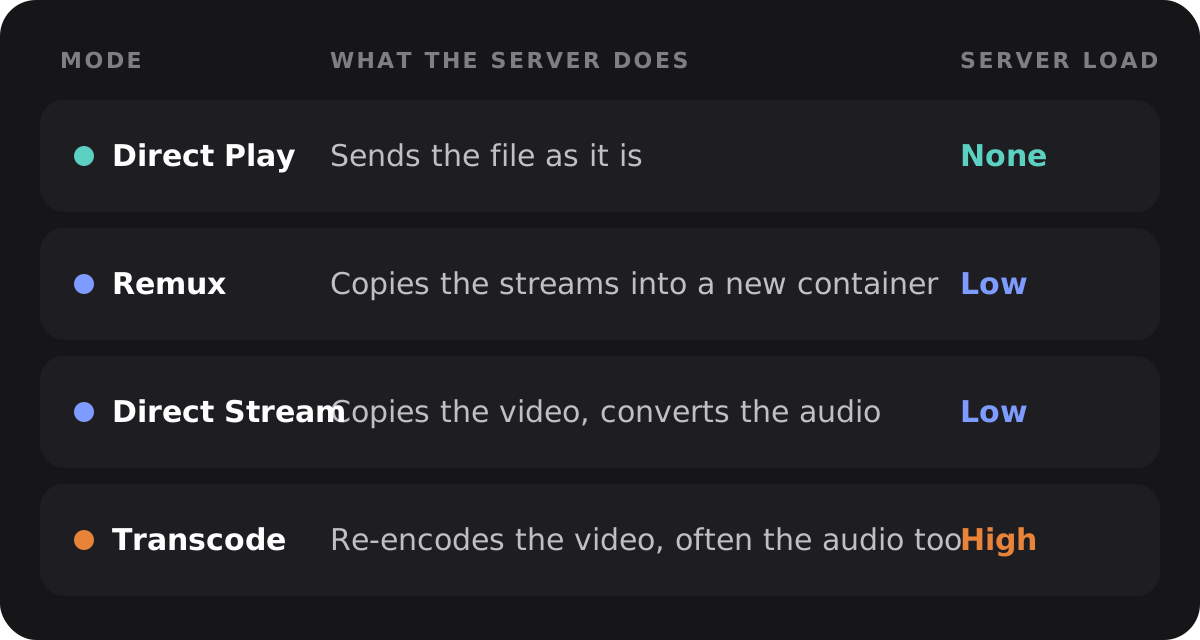
Jellyfin's own transcoding docs define the four playback types, ordered from least to most server load:
- Direct Play "delivers the file without transcoding. There is no modification to the file and almost no additional load on the server."
- Remux "changes the container but leaves both audio and video streams untouched." The video and audio data are copied as they are into a new container, for example from MKV to another container the client prefers.
- Direct Stream "transcodes audio but leaves original video untouched." Only the audio is converted; the video stream is copied.
- Transcode re-encodes the video stream. This is the one that costs real CPU or GPU time, because every frame is decoded and encoded again.
The same page states that transcoding is always started by the client, not chosen by the server on a whim. Every client sends a device profile describing which containers, codecs, resolutions, bitrates and subtitle formats it can handle. The server compares the file against that profile and picks the cheapest playback type that still works. If nothing matches, the file transcodes.
This is why the same file can Direct Play on one device and transcode on another: the file has not changed, the device profile has. A phone app with a wide codec list gets Direct Play; a browser tab with a narrow one gets a transcode.
How to see the actual reason in the dashboard
Guessing wastes time, and Jellyfin already tells you why. Sign in as an administrator, open Dashboard, then Playback, and look at the active session for the file in question. Jellyfin's web client labels this field Reason for transcoding in its own source strings (the string key is LabelReasonForTranscoding, confirmed in jellyfin-web's English strings file). A jellyfin-web issue about a missing reason confirms the same text also shows up in a session's playback-info overlay on the client side, though the dashboard view sometimes needs a manual refresh to catch up.
The value you see is one or more names from Jellyfin's TranscodeReason enum, defined in MediaBrowser.Model/Session/TranscodeReason.cs. It is a flags enum, so a single transcode can list several reasons at once, for example an unsupported video codec together with a subtitle that needs burning in.
Transcode reasons, decoded: cause and fix
The table below covers the reasons the enum actually defines, matched to what usually triggers them and what to do about it.
| Reason (from Jellyfin's source) | Typical cause | Fix |
|---|---|---|
ContainerNotSupported | The client's device profile does not list the file's container, for example MKV on a client that only declares MP4 | Remux to a container the client lists, or switch to a client with a wider container list |
VideoCodecNotSupported | HEVC, AV1 or another codec the client cannot decode: older TVs, most desktop browsers with AV1 but not HEVC, or the reverse on Safari | Use a client or browser that decodes the codec (see the codec support table), or accept a server-side transcode with hardware acceleration turned on |
AudioCodecNotSupported | DTS or TrueHD audio, both unsupported in Chrome, Edge and Firefox per Jellyfin's codec support table, though supported on Android, Android TV, Roku and Kodi | Play through a native app instead of a browser tab, or pick a different audio track if the file has one |
SubtitleCodecNotSupported | PGS or VobSub (picture-based subtitles), or ASS/SSA on a client that does not render it | See our subtitles guide for the full breakdown; use a client that draws the format itself, or keep the subtitle external in a format the client lists |
ContainerBitrateExceedsLimit | The file's overall bitrate is above the server's or the client's bitrate ceiling | Raise or clear the Internet streaming bitrate limit (Mbps) for local playback; see the bitrate section below |
VideoBitrateNotSupported / AudioBitrateNotSupported | The video or audio stream's own bitrate, specifically, is above the cap, separate from the container-wide limit | Same fix as above; also check Fallback max stream bitrate (Mbps), used when Jellyfin cannot read the source bitrate at all |
VideoBitDepthNotSupported | 10-bit video the hardware cannot decode, most often 10-bit H.264 | See the 10-bit section below; re-encoding to 10-bit HEVC usually solves it, because far more hardware decodes that instead |
VideoRangeTypeNotSupported | The client's device profile does not declare support for the file's HDR type (HDR10, HDR10+, HLG or Dolby Vision) | Play on a client that declares that HDR type, or let the server tone-map to SDR; covered in full in our Dolby Vision and HDR article |
That last mechanism, matching a file's HDR type against what the client declares, comes from Jellyfin's own pull request that added VideoRangeType to its stream-selection logic: the server "will follow the condition from clients to make a right decision between using Transcoding, DirectPlay, DirectStreaming or Remuxing."
The causes, one at a time
Subtitle burn-in
Picture-based subtitle formats, PGS from Blu-ray rips and VobSub from DVDs, are not text. There is nothing for the server to convert, so if the client does not draw the picture itself, Jellyfin burns it into the video. The codec support docs call this "the most intensive method of transcoding," because the server decodes the video, paints the subtitle on every frame, and encodes the result again. ASS and SSA subtitles cause the same problem on a client that does not render them, since Jellyfin will not convert ASS to a plain-text format either. Our subtitles guide covers the full decision path, naming conventions and per-client support in detail.
HEVC and AV1 on the wrong client
HEVC support varies by browser and platform: Safari plays it natively, Chrome and Firefox need extra conditions (a Windows codec pack for Firefox, for instance), and older Android devices often cannot decode it at all. AV1 runs the other way in browsers, with Chrome, Edge and Firefox supporting it natively while Safari's support is conditional. A file encoded once in either codec can therefore Direct Play on one device and transcode on the next, purely based on what that client's device profile declares.
DTS and TrueHD audio
These two audio codecs are common on Blu-ray remuxes but are not supported in Chrome, Edge or Firefox, according to Jellyfin's codec support table, while Android, Android TV, Roku and Kodi do support them. If you watch mostly through a browser tab, this is a frequent, easy-to-miss reason for an otherwise unnecessary transcode. Switching to a native app, or picking a different audio track when the file offers one, avoids it without touching the server.
Bitrate limits, local and remote
Jellyfin can cap the bitrate of a stream, and a cap set too low forces a transcode down to that ceiling even for a file the client could otherwise play untouched. The relevant setting, confirmed in jellyfin-web's own source strings, is Internet streaming bitrate limit (Mbps) under Dashboard > Playback > Streaming, described in its own help text as "an optional per-stream bitrate limit for all out of network devices," which "may result in increased CPU load on your server in order to transcode videos on the fly to a lower bitrate." A per-user override of the same limit exists on each user's profile page. There is also a Fallback max stream bitrate (Mbps), used only when Jellyfin cannot read a file's real bitrate through ffprobe.
Because that limit applies specifically to "out of network devices," Jellyfin has to tell local and remote clients apart, and that detection can go wrong. A Jellyfin GitHub discussion about the bitrate limit shows a real case where a client behind a reverse proxy was logged as local (IsInLocalNetwork: True) even though it was connecting from outside, because the proxy's address was not registered. The fix, per Jellyfin's reverse proxy docs, is adding the proxy's address under Known Proxies in Network settings, so Jellyfin can read the X-Forwarded-For header instead of the proxy's own connecting IP. Without it, remote-only limits either fail to apply or apply somewhere they should not. Our guide to remote access covers the same setting from the access side, including the local network list that this detection depends on.
10-bit video without matching hardware
Ten-bit color is common in HDR files and some HEVC encodes, and it needs a decoder built for it. Jellyfin's own hardware acceleration docs state plainly that "the hardware decoding of H.264 / AVC 10-bit (High 10 profile) video is not supported by any Intel, NVIDIA and AMD GPU." When that happens, decoding falls back to the CPU, which is slow, and the docs recommend re-encoding such files to 10-bit HEVC instead, since HEVC's 10-bit decode support is far broader across all three vendors starting from specific generations (Intel Kaby Lake and up, Nvidia's Maxwell 2nd generation and up, AMD's Polaris and up). Our hardware acceleration guide walks through checking your exact GPU generation against these floors.
HDR content on a client that never declared it
The codec support docs are direct about this: "any HDR content will have to be converted to SDR by the server for proper playback on these clients," referring to clients that do not list HDR10, HDR10+, HLG or Dolby Vision in their device profile. Jellyfin can tone-map HDR down to SDR in hardware, but only down, never across formats or up, and only once the underlying GPU can decode the source's 10-bit stream in the first place. Since this touches Dolby Vision specifically, and Dolby Vision has its own quirks around profiles and fallback layers, we cover it on its own in a separate article.
Which clients avoid transcoding more often
None of this is really about one setting; it is about how much a client's device profile actually declares. Clients built around VLC or mpv, rather than a platform's own limited player, tend to Direct Play more of a typical library, because those engines decode far more containers, codecs and subtitle formats on the device itself.
Swiftfin, the Jellyfin project's own Apple client, states this directly in its README: it was "made using Swift to maximize direct play with the power of VLC and look native on all classes of Apple devices." Its own player comparison document lists containers, audio codecs (including DTS and TrueHD) and subtitle formats that its VLC player supports and its native AVPlayer path does not, closing with a plain statement: "unsupported codecs will require transcoding to play." Jellyfin's own codec support table shows the same pattern across platforms: iOS clients using VLCKit list full HEVC support in both 8-bit and 10-bit, where the platform's native player alone would not.
Swiftly Player takes the same approach on every platform it runs on. Per its own documentation, it declares containers, codecs and every subtitle format it supports in its device profile, and plays through VLC (libVLC on Windows, Linux and Android, VLCKit on Apple devices), so the server has little reason to re-encode a file Swiftly can already read. Our comparison of Jellyfin clients for Android TV and our upcoming comparison for Apple TV go through several other VLC- and mpv-based clients with the same trait.
FAQ
Why is my file transcoding even though the codec should be supported?
Check the exact reason in Dashboard > Playback first, rather than assuming it is the video codec. The subtitle format, the audio codec, a bitrate limit or the file's bit depth can each force a transcode on their own, even when the main video codec would have played without any conversion.
What does "Reason for transcoding" mean in the dashboard?
It is a field in Jellyfin's active session view, drawn from the TranscodeReason flags enum in Jellyfin's source code. It can list more than one reason at once, since a single file can fail more than one check in the client's device profile at the same time.
Why do subtitles force a transcode even when the video plays fine?
Picture-based formats like PGS and VobSub have no text for the server to convert, so a client that cannot draw them itself gets the subtitle burned into the video, which needs a full video transcode. See our subtitles guide for the format-by-format breakdown.
Does a bitrate limit affect playback on my home network?
The Internet streaming bitrate limit (Mbps) setting, per its own help text, applies to devices Jellyfin considers out of network. It should not affect local playback, but if Jellyfin misreads a local client as remote, commonly behind a reverse proxy without Known Proxies configured, the limit can apply where it should not.
Why does 10-bit video transcode even though my server has a hardware-acceleration GPU?
No Intel, Nvidia or AMD GPU hardware-decodes 10-bit H.264, according to Jellyfin's own hardware acceleration docs. The fix is usually re-encoding the source to 10-bit HEVC, which has much wider hardware decode support, rather than expecting 10-bit H.264 itself to become hardware-accelerated.
Which Jellyfin client avoids transcoding most reliably?
There is no single answer for every library, but clients built on VLC or mpv, such as Swiftfin, Swiftly Player and several Android TV clients, tend to Direct Play a wider range of files than clients using a platform's own limited player, because they decode more containers, codecs and subtitle formats on the device itself.
Summary
Jellyfin only transcodes when a file falls outside what the client's device profile declares, and the dashboard's Reason for transcoding field says exactly why, rather than leaving it to guesswork. Picture subtitles, HEVC or AV1 on a narrow client, DTS or TrueHD in a browser, a bitrate limit set too low, 10-bit video without matching hardware, and HDR without a client that declared it cover most real cases. Fix the specific reason the dashboard names, check the file against a client with wider codec support, or accept a transcode with hardware acceleration turned on when there is no other option.