Jellyfin 12: what changed and what to check before you upgrade
Jellyfin's new version numbers, what 12.0 and 12.1 actually changed, plugin and client compatibility, and what to back up first.
By Swiftly Player9 min read
Disclosure: we build Swiftly Player, one of the clients in this article. We point out where other apps do better.
In September 2026 the Jellyfin server went from 10.x straight to 12.0. Version 12.1 followed a week later. Every claim below comes from the project's own release notes.
TL;DR
Jellyfin 12.0 is the release that would have been 10.12, and 12.1 is a bugfix release on top of it. Before you upgrade, make a full backup of the data directory, because 12.0 changes the database and you cannot roll back without that backup. Remove third-party plugins first and add them back once their authors have a build for 12.0.
A new number, not a new decimal point
For years, Jellyfin server versions looked like 10.10 or 10.11. The 12.0 release from September 8, 2026 changed that. The release that would have been 10.12.0 is now simply 12.0. There is no 11. According to the official 12.0 announcement, the new number marks a major release instead of a routine minor update. It does not mean more was shipped than in a normal release. The next version after 12.0 is 12.1, not 12.0.1 or 10.12.1. On Jellyfin's GitHub releases page, v12.1 comes right after v12.0, with the release candidates v12.0-rc1 to v12.0-rc7 in between as pre-releases.
If your scripts, monitoring or documentation read the version as 10.x.y, update them for the new two-part numbers.
What changed in 12.0
Before you touch it: backup and version requirements
The 12.0 release notes start with this warning: "a full backup of the data directory is strongly recommended, as this release includes database changes that prevent rolling back without a full restore." They also list the supported upgrade paths.
| Your current version | Recommended path |
|---|---|
| 10.10.7 | Direct upgrade to 12.0 supported |
| Any 10.11.x | Direct upgrade to 12.0 supported |
| Older than 10.10.7 | Upgrade to 10.10.7 first |
The first library scan after the upgrade "will take significantly longer than normal", the notes say. Jellyfin checks every library item against the files on disk and cleans up leftover data. While this runs, some movies may briefly show up as newly added.
Database and performance
Playlists and collections now use a proper relational structure with a new LinkedChildren table, instead of serialized child lists. OwnerId and PrimaryVersionId are now real foreign keys. According to the release notes, this makes Resume, Next Up and item counts faster. Some migrations run once during the upgrade. They merge duplicate music artists and people, remove orphaned extras, and repair wrong owner links. Items are now deleted in batches. The notes say this fixes "too many SQL variables" errors when you delete many items at once. A new --mode startup flag (MediaServer, MigrateSystem, SeedSystem) runs a migration on its own, without starting the server. That helps in a container setup where you want to control when the migration happens.
Breaking and behavior changes
These come from the 12.0 release notes.
- The old
/emby/and/mediabrowser/route prefixes are removed. Old third-party apps that still use them stop working. - Legacy authorization is off by default. A migration also turns it off on existing installs.
- Some old API routes are gone, among them
POST /Users/{userId}/EasyPasswordandGET /QuickConnect/Initiate. - Subtitle settings moved from one global setting to settings per library.
.oggfiles now count as audio, not video..aifcis recognized as audio..aiffis no longer treated as an image.- From 12.0, usernames are "case insensitive", according to the release notes. They are stored in a case-normalized column with a unique index. If two usernames differ only in capitalization, fix that before you upgrade.
- Image endpoints no longer scale artwork above its original resolution.
Notable new features
The main additions in the release notes are these.
- Multiple versions for episodes, such as broadcast cut, extended cut or different resolutions. Before, only movies had this.
- Better book and comic support. Jellyfin reads local metadata from OPF and ComicInfo files, creates posters for EPUBs and comic archives, and adds ISBN-based external IDs. The release notes give this its own section and call it an area the project is actively investing in.
- Search providers. Plugins can add their own results next to Jellyfin's own search.
- The Modern web layout is now the default. The previous interface is now called "Legacy".
- FFmpeg 8.1. The release notes mention optimizations to CUDA transposing and OCL scaling/tonemapping filters.
12.1: the bugfix release
12.1 came out on September 15, 2026, one week after 12.0. Its release notes describe it as a bugfix release with 47 pull requests and no new features. Some of the fixes:
- Nested season folders without numbers no longer collapse into the first one.
- A remembered subtitle choice no longer overrides forced-only subtitles.
/UserViewsno longer runs out of memory.- Revoking a device's access now logs out its existing sessions.
- Parental ratings match regardless of capitalization.
The 12.1 notes give the same advice as 12.0 and ask for a full backup first. Jellyfin announced the release on its community forum, not in a jellyfin.org blog post.
Plugins: what breaks and what to check
According to the 12.0 release notes, the server now targets .NET 10 and "numerous plugin interfaces changed". They recommend these steps.
- Before migrating to 12.0, remove all installed repository plugins (anything not built into the server).
- If you switched the plugin repository to an unstable feed, set it back to the stable URL
https://repo.jellyfin.org/files/plugin/manifest.json. - After the upgrade, add third-party plugins again once their authors have a build for 12.0.
- Run a full library scan. Otherwise the migration can remove alternate versions of media that Jellyfin grouped automatically instead of you merging them by hand.
Intro Skipper is one example. Its README says the default branch needs Jellyfin 12.0.0 or newer, and there is a separate release line for 10.11. A server on 10.11.x needs the 10.11 build. If you upgrade to 12.0 without installing the matching release, the plugin cannot load.
Before you upgrade: a short checklist
When you are done, your server runs 12.x and you have a backup to go back to.
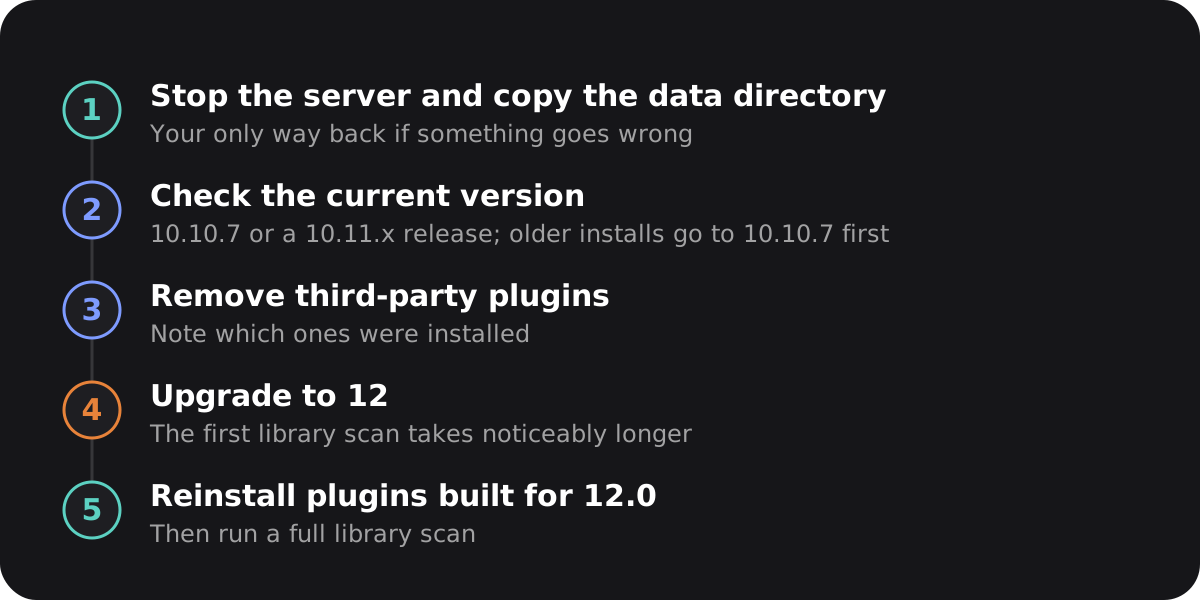
- Stop the server and copy the data directory. This copy is the only way back if something goes wrong.
- Check that you are on 10.10.7 or a 10.11.x release. If you are on something older, upgrade to 10.10.7 first.
- Check for usernames that differ only in capitalization.
- Write down which third-party plugins you have, then remove them.
- If the plugin repository points to an unstable feed, set it back to the stable manifest.
- Upgrade the server.
- Run a full library scan. Expect it to take clearly longer than usual.
- Reinstall each plugin once a build for 12.0 exists.
Clients: check the app, not just the server
The Jellyfin web client comes with the server and always matches it, so you don't need to check it. Other apps are different. A server on 12.0 does not mean every app was built or tested against 12.0. Jellyfin's own Android TV app is one example. When 12.0 and 12.1 came out, it was still in beta on an older SDK. Its v0.19.10 notes say the upcoming 0.20 beta needs "Jellyfin 10.11 or newer". The v0.20.0-beta.1 changelog lists "Use Jellyfin 10.11 based SDK" as a highlight. Both came out in the same weeks as 12.0 and 12.1.
This does not mean the app fails on 12.0 or 12.1. The removed routes only affect apps that still use the old /emby/ and /mediabrowser/ prefixes, and official apps don't. It does show that an app can lag behind the server version. So read your app's release notes before you upgrade the server. It takes two minutes.
FAQ
Do I have to upgrade to 12.0 or 12.1 right away?
No. Jellyfin kept publishing 10.11.x patch releases up to 10.11.11 before 12.0 came out. The release notes do not say that 10.11 support ends right away. If a plugin you need has no 12.0 build yet, it makes sense to wait.
Will my existing plugins just stop working after I upgrade?
Third-party (repository) plugins, yes. The 12.0 release notes say plugin interfaces changed and the server now targets .NET 10. Remove them before you upgrade and add them again once an updated build exists. Built-in providers are not affected.
Can I go back to 10.11 if something goes wrong after upgrading to 12.0?
Only with a full backup from before the upgrade. The release notes say 12.0's database changes prevent rolling back without a full restore. That is why they call a backup "strongly recommended".
Does Intro Skipper still work after upgrading?
Only with the release built for your server version. The default branch needs Jellyfin 12.0.0 or newer. Servers that stay on 10.11 need the separate 10.11 release line. With the wrong one, the plugin cannot load.
Does the new version number mean Jellyfin skipped "11"?
Yes. There was never a version 11.x. The numbers changed from 10.y to a plain major number, and the release that would have been 10.12 came out as 12.0.
Summary
12.0 is more than a new number. It needs a backup, changes the database so you cannot roll back without that backup, removes old API routes, and needs plugins rebuilt for .NET 10. 12.1 followed a week later with 47 fixes and no new features. To upgrade, follow Jellyfin's release notes. Back up, check your current version, remove third-party plugins, upgrade, run a full scan, and reinstall plugins once their authors have caught up. Also check your apps' release notes instead of assuming they are ready for the new version.