Jellyfin on Android TV and Google TV: which app to install (2026)
The official Jellyfin app, Wholphin, Moonfin, Streamyfin, Kodi add-ons and Findroid on Android TV: playback, Media Segments, servers, install sources.
By Swiftly Player11 min read
Disclosure: we build Swiftly Player, one of the clients in this article. We point out where other apps do better.
Version numbers and release dates come from each project's GitHub releases and README, checked in September 2026. These apps change often, so check the linked source before you rely on a detail.
TL;DR
If you are not sure, start with the official Jellyfin for Android TV app. It comes from the Jellyfin project, supports Skip Intro and saved servers, and is on Google Play, Amazon Appstore and F-Droid. Pick Wholphin for a different interface with MPV, Moonfin if you also run Emby, or Kodi with Jellyfin for Kodi or JellyCon if you already use Kodi. Swiftly Player is worth a look if you want VLC playback and the same app on Apple TV, Windows and Linux, but on Android TV it is still in a closed test.
Comparison table
| Client | Android TV / Google TV | Playback engine | Skip Intro / Media Segments | Multiple servers | Install source | Latest release checked |
|---|---|---|---|---|---|---|
| Jellyfin for Android TV (official) | Yes | Media3 ExoPlayer with FFmpeg decoder, libass; optional external player | Yes, per segment type | Yes (saved servers) | Google Play, Amazon Appstore, F-Droid, APK | v0.19.10 stable, v0.20.0-beta.2 |
| Wholphin | Yes | ExoPlayer or MPV | Yes, per segment type | Yes (server switching) | Google Play, Amazon Appstore, APK | v1.0.8 |
| Moonfin | Yes | Media3 / ExoPlayer on Android TV | Yes (intros, credits, pre-rolls) | Yes, merged into one library | Google Play, Amazon Appstore, APK | 2.5.1 |
| Streamyfin | TV APK on GitHub releases | MPV | Yes (intro and credits) | Not verified | GitHub APK; Google Play for Android | v0.54.1 |
| Kodi + Jellyfin for Kodi | Yes (Kodi on Google Play) | Kodi's own player | Not listed in README | Not listed in README | Kodi Jellyfin Repository | v2.2.0 |
| Kodi + JellyCon | Yes (Kodi on Google Play) | Kodi's own player | Not listed in README | Yes (users and servers) | Kodi Jellyfin Repository | v1.0.2 |
| Findroid | No, planned | ExoPlayer or mpv | Yes (phone app) | Yes (phone app) | Google Play, Amazon, F-Droid, IzzyOnDroid | v1.1.0 |
| Swiftly Player | Yes, in closed testing | libVLC | Yes (intro, recap, credits) | Yes (servers and accounts) | Closed Google Play test | 1.0.3 on Apple, Windows, Linux; Android in testing |
Jellyfin for Android TV (official)
jellyfin/jellyfin-androidtv is the Jellyfin project's own TV client. You can install it from Google Play, Amazon Appstore, F-Droid or the download archive at repo.jellyfin.org. The README names Android TV, Nvidia Shield and Amazon Fire TV as target devices. The latest stable release is v0.19.10 from 16 August 2026. Two betas, v0.20.0-beta.1 and v0.20.0-beta.2, followed in September 2026. F-Droid listed 0.19.10 as its current version.
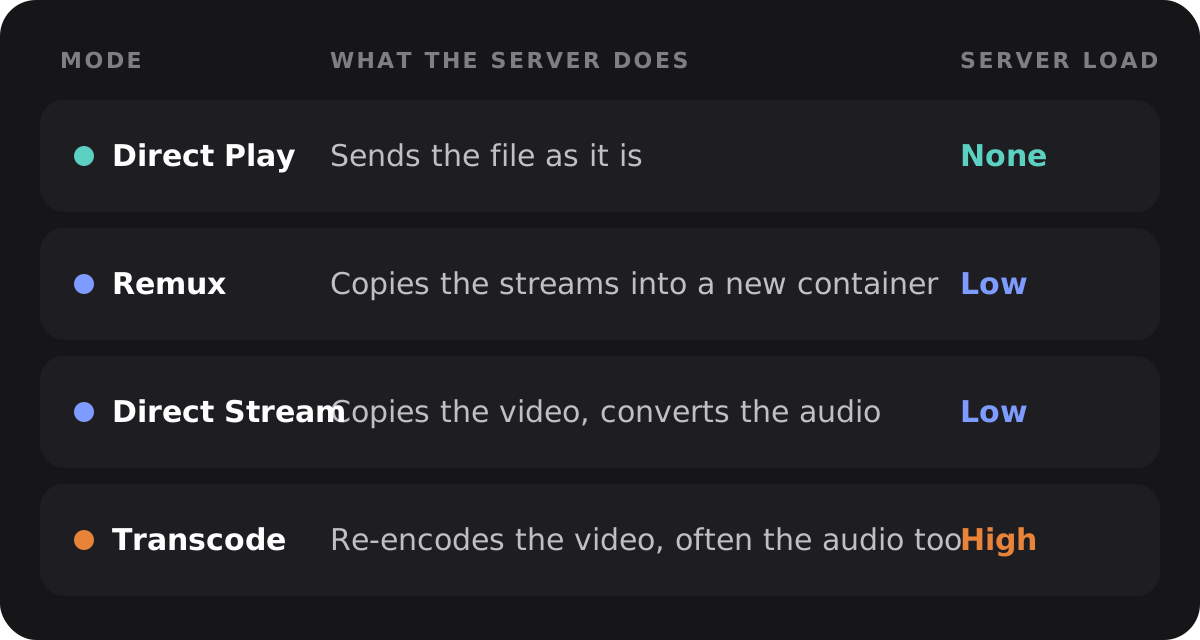
Playback. The app uses AndroidX Media3 ExoPlayer 1.11.1, according to its dependency file. It adds Jellyfin's Media3 FFmpeg decoder and libass for ASS/SSA subtitles. The app tells the server which formats the device can play. The server then picks Direct Play (the file plays as it is) or transcoding (the server converts it first). Beta 1 adds an option to always burn in subtitles when transcoding. It also adds a choice for an external video player, called "External app" in the string resources.
Media Segments. Media Segments are marked parts of an episode, such as the intro or the credits. The app has a Media Segments settings screen. For intros, outros, recaps, previews and commercials you choose "Ask to skip", "Skip" or "Do nothing". The segment data comes from the server, for example from a segment provider plugin.
Servers and accounts. The app can save and manage several servers. Its strings include "Saved servers", "Manage servers" and a login section called "Servers, accounts, automatic sign in".
Who it fits. People who want a client maintained alongside the server, or who want an F-Droid build.
Wholphin
Wholphin is an open-source Android TV client for Jellyfin with a Plex-inspired interface. It is not a fork of the official app. The README says its interface was written from scratch. The latest stable release checked was v1.0.8 from 14 September 2026.
Playback. You can choose between two players. ExoPlayer has optional software decoding for extra audio formats, SSA/ASS and AV1. MPV is the README's choice for Direct Play of files with SSA/ASS subtitles. The README also lists D-pad seeking, chapters and the queue during playback, and auto-play of the next episode with an inactivity check. Wholphin switches refresh rate and resolution on supported displays. It also has Trickplay previews (thumbnails while you seek), Live TV and DVR.
Media Segments. Intros, outros, previews and commercials each have their own skip setting, according to the string resources.
Servers, subtitles, Seerr. You can add, select and switch servers. Profiles can be locked with a PIN. Subtitle styling has separate settings for HDR. Subtitle search works through a server plugin such as OpenSubtitles. Seerr, a tool for requesting movies and shows, is only in the GitHub and Google Play builds, according to the README.
Install. Get it from Google Play or Amazon Appstore. You can also sideload it, which means installing the APK file from GitHub by hand. The README gives the Downloader code 8668671. Wholphin needs Android 6 or Fire OS 6 and Jellyfin server 10.10.x or 10.11.x.
Moonfin
Moonfin is a client for Jellyfin and Emby, built with Flutter. One codebase covers Android, Android TV and Google TV, Fire TV, iOS, Apple TV, macOS, Windows, Linux and the web. The latest release checked was 2.5.1 from 28 August 2026. Android TV needs Android 7.0. The README lists Jellyfin 10.8.0 or later.
Playback. On Android TV, Moonfin uses native Media3 / ExoPlayer, according to the Playback and Codecs wiki page. Moonfin tells the server which decoders the device really has. The server then only transcodes what the device cannot play. The page also lists Dolby Vision Profile 7 direct play and audio passthrough on Android TV.
More features. The README lists skipping of pre-rolls, intros and credits, and one library that merges several Jellyfin and Emby servers. It also lists Seerr, Live TV and DVR, SyncPlay, Quick Connect sign-in, downloads and an admin panel. Some features, such as the web version, need the separate Moonfin server plugin.
Install. Google Play (org.moonfin.androidtv), Amazon Appstore, or the Moonfin_AndroidTV APK from GitHub releases.
Who it fits. Households that run both Jellyfin and Emby, or that want the same app on TVs, phones and computers.
Streamyfin
Streamyfin is a community Jellyfin client built with Expo. It is mainly made for iOS and Android phones, and TV builds came later. The v0.54.1 release from 2 June 2026 adds Android TV recommendations and a reworked TV interface. Its downloads include a streamyfin-android-tv-apk.apk next to the phone APK. The same notes say the Apple TV version is on the App Store. I could not confirm that the Google Play listing works on Android TV devices. On Android TV, the confirmed way is the GitHub APK.
MPV is the main player on all platforms, according to the README. It also lists Skip Intro and credits, downloads and Seerr. Patreon members get beta builds through Discord.
Who it fits. Streamyfin phone users who want the same client on a TV and don't mind sideloading.
Kodi with Jellyfin add-ons
The Jellyfin documentation for Kodi lists two add-ons. Both belong to the Jellyfin GitHub organization. You install them from the Kodi Jellyfin Repository (repository.jellyfin.kodi.zip from https://kodi.jellyfin.org). Kodi itself is on Google Play.
On Android TV and Fire TV, the docs describe these steps:
- Open Kodi's File Manager.
- Add
https://kodi.jellyfin.orgas a file source. - Choose "Install from Zip File".
Jellyfin for Kodi (jellyfin/jellyfin-kodi, latest release v2.2.0 from 17 September 2026) copies the Jellyfin libraries you pick into Kodi's own database. The README lists Direct Play and transcoding, watched and resume state synced both ways, and remote control of Kodi from other Jellyfin clients. It supports the current Kodi release plus or minus one, so Nexus, Omega and Piers. The Jellyfin docs say it tends to take over the Kodi database and does not mix well with other media sources.
JellyCon (jellyfin/jellycon, latest release v1.0.2 from 6 July 2026) works like a normal Kodi streaming add-on. It asks the server for content while you browse and does not sync anything. The README mentions switching between several user accounts and Quick Connect login. The Jellyfin docs add that it makes switching servers easier.
Neither README mentions Media Segments or Skip Intro, so the table does not mark them as supported.
Who it fits. People who already use Kodi, rely on Kodi skins or other add-ons, or keep some media outside Jellyfin.
Findroid
Findroid is a native Jellyfin app for Android from a third-party developer. Its README lists ExoPlayer and mpv as players, downloads, Picture in Picture, Trickplay, and Media Segments with a skip button and auto skip. It only does Direct Play and never asks the server to transcode. The latest release checked was v1.1.0 from 18 July 2026.
The README lists Android TV under "Planned features". The repository has an app/tv module. But the v1.1.0 downloads are the normal APKs for each processor type, and none is marked as a TV build. For now, Findroid is a phone and tablet app.
Swiftly Player
Swiftly Player is a free, open-source client for Jellyfin, released under the MPL-2.0 license with its source on GitHub, with no account, no tracking and no ads. On Android and Android TV it is in a closed Google Play test: testers join through the swiftly-beta@googlegroups.com group, with the steps on swiftlyplayer.com/android. The released version 1.0.3 runs on iPhone, iPad, Apple TV and Mac through the App Store, and on Windows and Linux through GitHub releases.
Playback. Swiftly uses libVLC on Android, like on Windows and Linux (VLCKit on Apple devices). It asks for Direct Play and Direct Stream, and VLC plays MKV, HEVC, AV1, VP9, DTS, TrueHD and PGS subtitles on the device, so the server does not transcode. It has Skip Intro, Skip Recap, Skip Credits and automatic playback of the next episode. It remembers audio and subtitle choices per series and supports external subtitles. You can use several servers and accounts at once, sign in with Quick Connect, request titles through Seerr, and resume playback started on another device.
Limits. It is a young app with a smaller community than the official client. There is no SyncPlay, no Live TV and no casting. Until the test ends, you need an invite to install it.
Who it fits. People who want one free client with VLC playback on the TV, the phone and the computer, and who don't mind joining a test.
FAQ
Does the official Jellyfin Android TV app support Skip Intro?
Yes. In the Media Segments setting you choose "Ask to skip", "Skip" or "Do nothing" for intros, outros, recaps, previews and commercials. The server needs segment data, for example from a segment provider plugin.
Which Kodi add-on should I use for Jellyfin?
Both come from the Kodi Jellyfin Repository. Use Jellyfin for Kodi if you want your Jellyfin libraries in Kodi's own database. Use JellyCon if you want to browse the server directly and switch users or servers more easily.
Is there a Findroid version for Android TV?
No release yet. The README lists Android TV as planned, even though the repository has a TV module.
Which clients can play files without transcoding on the server?
All of them ask the server for Direct Play when the device can decode the file. Wholphin and Streamyfin offer MPV, and Swiftly uses libVLC. Both play more formats and subtitles on the device itself. The official app and Moonfin use Media3 ExoPlayer. The official app adds an FFmpeg decoder module. Whether a file gets transcoded still depends on the device's hardware decoders and the server settings.
Can I use Swiftly Player on Android TV now?
Yes, if you join the closed Google Play test through swiftlyplayer.com/android. There is no public Play Store listing yet.
Summary
- Pick Jellyfin for Android TV if you want the project's own client, Media Segments support and an F-Droid build.
- Pick Wholphin if you want a TV-only client with a choice of ExoPlayer or MPV and per-type skip settings.
- Pick Moonfin if you also run Emby or want the same client on TVs, phones and computers.
- Pick Kodi with Jellyfin for Kodi or JellyCon if Kodi is already your media center.
- Try Streamyfin on Android TV only if you are fine with sideloading a GitHub APK.
- Try Swiftly Player if you want VLC playback and the same free app across Apple TV, Windows, Linux and Android, and you are fine with joining a closed test.
- Findroid is not an option for Android TV today. Its README lists TV support as planned.