Best Jellyfin clients for Windows in 2026
Jellyfin Desktop, Fladder, Kodi with a Jellyfin add-on, the browser and Swiftly Player compared for Windows: playback engine, Skip Intro, servers, install.
By Swiftly Player8 min read
Disclosure: we build Swiftly Player, one of the clients in this article. We point out where other apps do better.
Jellyfin has no single official Windows app like it has for iOS or Android. On Windows you choose between a few independent projects, the browser, and Kodi with an add-on. Each claim below links to its source, checked at the time of writing.
TL;DR
Jellyfin Desktop is the Jellyfin web interface in its own window with libmpv for playback, so it has Skip Intro and multiple servers. Fladder adds downloads and Seerr, Kodi plays Jellyfin through an add-on, the browser needs no install, and Swiftly Player plays through libVLC, has "Resume on this device" and is the same free app on Linux, Apple devices and Android. No client wins on every point, so the table below shows what each one has.
Comparison table
| Client | Playback engine | Skip Intro / Media Segments | Multiple servers/accounts | Downloads | Install on Windows |
|---|---|---|---|---|---|
| Jellyfin Desktop | libmpv, inside a Qt WebEngine shell showing the web UI | Yes, via the web client's Media Segment Actions | Yes, connect and switch between separate servers | No | Installer or portable .exe from GitHub releases |
| Fladder | Flutter player (direct play and transcoded streams) | Yes, intro/credits skipping in the app | Yes, multiple accounts and servers | Yes, downloads with synced progress | .exe from GitHub releases |
| Kodi + Jellyfin for Kodi | Kodi's own player | Not listed in the add-on's README | Not listed in the add-on's README | Kodi's own offline sync | Kodi from kodi.tv, then the add-on from https://kodi.jellyfin.org |
| Kodi + JellyCon | Kodi's own player | Not listed in the add-on's README | Yes, easier switching between servers and users (no local sync) | No | Same Kodi repository as above |
| Browser (Jellyfin web client) | Browser's own decoder, or server-side transcoding for anything it cannot decode | Yes, Media Segment Actions per user | Yes | No | None, open the server's address |
| Swiftly Player | libVLC (Direct Play / Direct Stream) | Yes, Skip Intro, Skip Recap and Skip Credits where the server provides Media Segments | Yes, several servers and accounts | Not yet on Windows | Installer from GitHub releases |
Jellyfin Desktop
Jellyfin Desktop belongs to the jellyfin GitHub organization, so the Jellyfin team maintains it. Until v2.0.0 on December 14, 2025 it was called Jellyfin Media Player. That release also moved it to Qt 6. It warns that settings from the old name are not carried over automatically.
The project's introduction post says the client "takes the user interface from jellyfin-web, including the playback interface, and combines it with the extensive codec support from MPV". It also says "all features of the web client are available as usual, including server management" (Introducing Jellyfin Media Player). So Jellyfin Desktop is the web client's Modern layout in a Qt WebEngine window. Instead of the browser's video player, it uses libmpv. Because the interface is the web client, you get the same web features that the Jellyfin 12.0 release notes describe. That includes the per-user Media Segment Actions for Skip Intro, Quick Connect sign-in, and switching between several saved servers.
The v2.0.0 changelog lists MPRIS media-key support and a first multi-profile mode that you start from the command line. It also shows a backdrop before playback starts, like jellyfin-web does. Neither the changelog nor the README mentions Seerr or downloads.
On Windows, download the x64 installer or the portable build from the releases page. The README also links development builds if you want newer, unreleased changes.
Fladder
Fladder is a Flutter client by DonutWare, independent of the Jellyfin project. Its README calls it "a cross-platform Jellyfin Frontend built on top of Flutter". It lists streaming, downloads with synced watch progress, several accounts and servers, and Seerr/Jellyseerr integration. It also has trickplay scrubbing (thumbnails while you seek) and a comic book reader (.cbz/.cbr). The v0.11.1 release came out on September 8, 2026. A nightly build has the latest changes before the next release.
Fladder's README lists intro and credits skipping. It does not say whether this uses Jellyfin's Media Segments or its own detection. If your skip data comes from a server plugin such as Intro Skipper, test it on your own server first. Don't assume it works like the web client.
On Windows, Fladder comes as an .exe from its GitHub releases. The README warns that Windows Defender can wrongly flag Flutter apps as a threat. Fladder is also on Google Play (Android) and Flathub (Linux), and as a Docker image for the web version.
Kodi with a Jellyfin add-on
Kodi is not a Jellyfin client itself. It is a general media center that plays Jellyfin libraries through an add-on. Kodi for Windows runs on Windows 7 to 11 and installs like any other Windows program.
Jellyfin's Kodi documentation lists two add-ons. Both belong to the jellyfin GitHub organization. Both install from the same repository, https://kodi.jellyfin.org (the file is repository.jellyfin.kodi.zip).
- Jellyfin for Kodi copies the metadata of the libraries you pick into Kodi's local database. Browsing then works offline and uses Kodi's own library views.
- JellyCon asks the server directly and keeps no copy. According to the documentation, this makes it easier to switch between several Jellyfin servers or users.
Neither README (Jellyfin for Kodi, JellyCon) mentions Skip Intro or Media Segments at the time of writing. Treat it as not supported until that changes. Playback runs through Kodi's own player, which has supported a wide range of containers and codecs for a long time.
The browser
Open your server's address in a browser. You install nothing, and you always get the current web client with every change from the latest server release. Since Jellyfin 12.0, the Modern layout is the default. Media Segment Actions work the same as in Jellyfin Desktop, because it is the same interface.
What plays without transcoding depends on the browser. Transcoding means the server converts the file before sending it. Jellyfin's codec support documentation explains when that happens. If the browser cannot decode the video codec, audio codec, container or subtitle format, the server transcodes or remuxes the file. Video transcoding puts the most load on the server's CPU. The browser is fine for a quick stream on someone else's computer. It cannot promise Direct Play for a whole library.
Swiftly Player
Swiftly Player for Windows is available from GitHub releases, currently version 1.0.3. It plays through libVLC and asks for Direct Play or Direct Stream, so MKV, HEVC, AV1, DTS, TrueHD and PGS subtitles play without the server transcoding. The same app is on Linux, on iPhone, iPad, Mac and Apple TV through the App Store, and on Android and Android TV in a closed test. It is free, with no account, no tracking and no ads. The v1.0.3 release notes list Skip Intro and Next Episode buttons over the video when the server has Media Segments. The next episode starts by itself when the server knows where the credits begin. Audio and subtitle choices are remembered per series, and external subtitle files work.
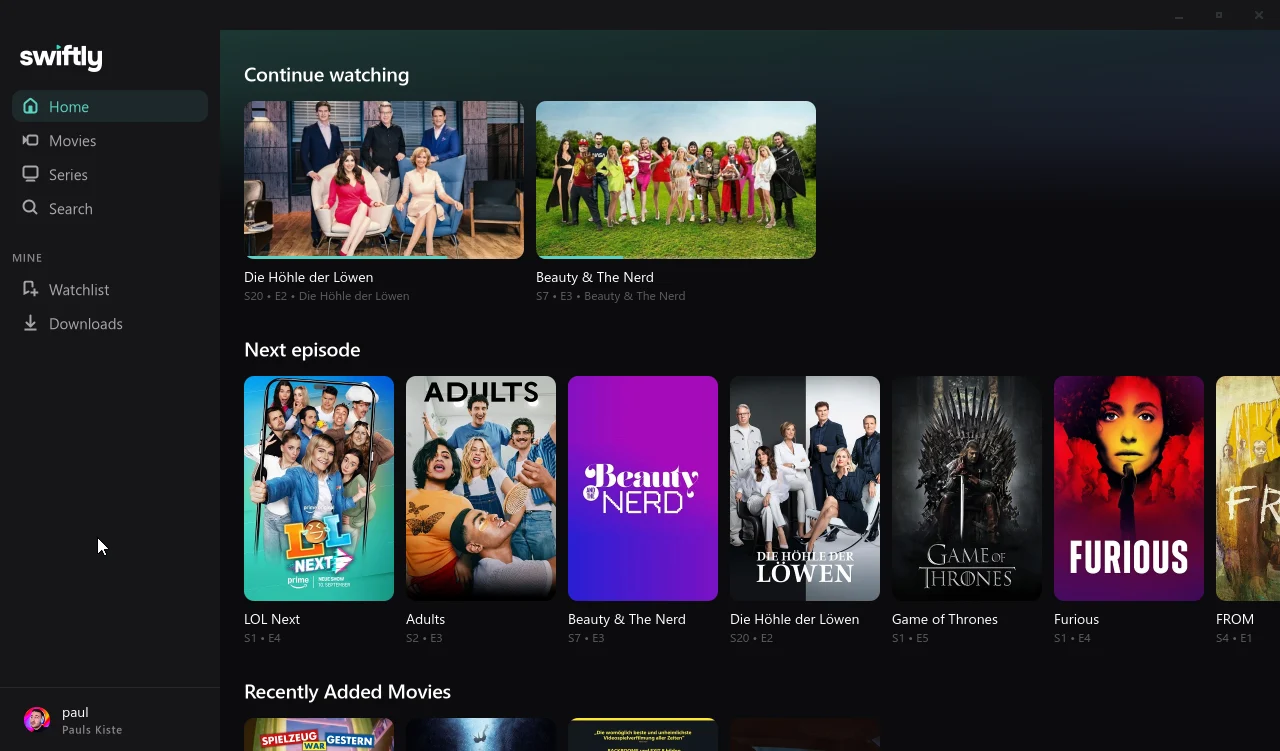
The installer is not code-signed, so Windows SmartScreen shows a warning. Click "More info", then "Run anyway", as the release notes describe. The first launch shows a loading window for up to a minute while Windows checks the unsigned app. Later launches take about a second. Swiftly keeps several Jellyfin servers and accounts side by side, supports Quick Connect sign-in and Seerr requests, and can take over playback started on another device. That comes from the App Store listing and the project README, which describe the same app on all its platforms. The Windows version has no downloads for offline playback at the time of writing, and Swiftly has no SyncPlay. It is also a younger project with a smaller community than Jellyfin Desktop or Kodi.
FAQ
Do I need a Jellyfin server to use any of these clients?
Yes. Every client here, including the browser, connects to a Jellyfin server that you or someone else runs. None of them includes a server.
Which of these clients avoids transcoding most reliably?
Jellyfin Desktop, Fladder and Swiftly Player use their own player (libmpv, Flutter's player or libVLC). They tell the server what they can play, so they don't depend on what a browser supports. Whether a file plays as Direct Play still depends on its codec and container. That differs from server to server and library to library, so this article cannot measure it in general.
Does Skip Intro work the same way in all of these?
No. Jellyfin Desktop and the browser use the web client's Media Segment Actions, set per user. Swiftly Player reads the same Media Segments from the server and shows its own Skip Intro, Skip Recap and Skip Credits buttons. Fladder lists intro and credits skipping but does not say how it works. The two Kodi add-ons do not mention Skip Intro at the time of writing.
Can I run more than one of these at the same time?
Yes. They are separate apps that read from the same server. Trying several on a test library only costs disk space and time.
Is Kodi worth it if I only want to watch Jellyfin?
Only if you want Kodi's own library and skins. Otherwise a Jellyfin client is simpler. With Kodi you install Kodi, add the repository, and install an add-on before you can see your Jellyfin server.
Sources
- jellyfin/jellyfin-desktop, v2.0.0 release notes
- Introducing Jellyfin Media Player
- DonutWare/Fladder, v0.11.1 release
- Jellyfin Kodi clients documentation, jellyfin/jellyfin-kodi, jellyfin/jellycon
- Kodi for Windows
- Jellyfin codec support documentation
- Jellyfin 12.0 release notes
- Swiftly Player repository, v1.0.3 release, App Store listing